
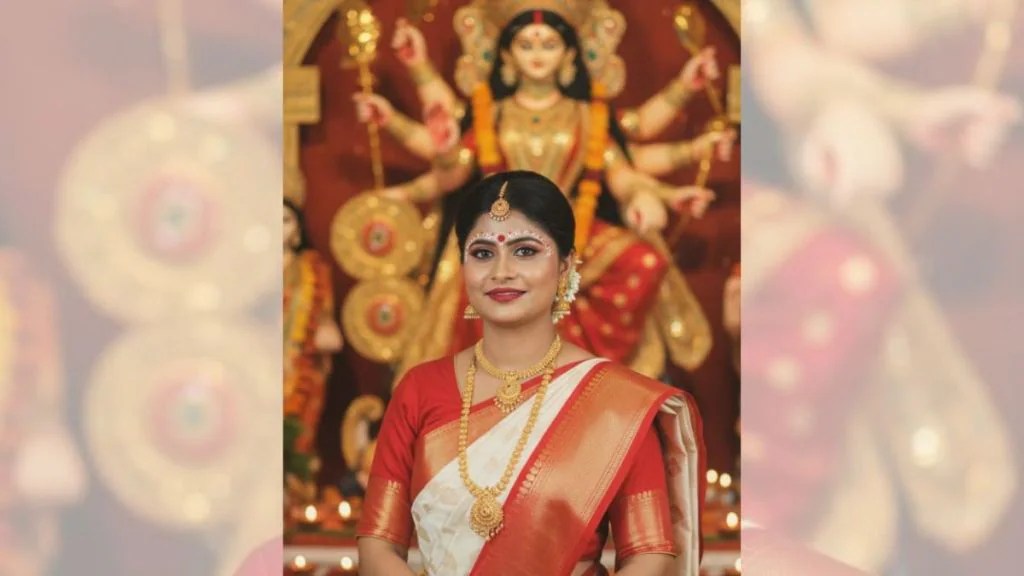
With Durga Puja just around the corner, social media feeds are lighting up with a new viral trend: using Google Gemini’s Nano Banana AI tool to generate festive saree and Puja looks. The trend blends tradition, nostalgia, and digital creativity, letting users experiment with saree drapes, jewellery, makeup, and cinematic lighting — all through AI-generated images. If you’re wondering how to join in, here are what’s going on, why people love it, and how you can create your own standout Puja-inspired visuals.
What is the Durga Puja Nano Banana Trend?
- The Nano Banana AI tool, part of Google Gemini’s image models (including Gemini 2.5 Flash Image), is being used by many to create stylised portraits featuring red-and-white sarees, traditional jewellery, temple or pandal backdrops, lamps (diyas), and more.
- These AI images evoke a vintage-film or retro texture: grainy light, warm golden tones, soft blur or film grain effects.
- It builds on earlier Nano Banana / Gemini trends (retro sarees, Garba edits) but is now focused more on festival style imagery as part of Durga Puja / Navratri celebrations.
Top 5 Prompts to Try: Your Festive Saree Look
Here are five popular prompts being used by people to get beautiful Durga Puja AI portraits. Feel free to use them as-is or tweak them for your own style:
Prompt 1
“Create a 4K HD realistic Durga Puja portrait. Woman wearing a red and white saree with traditional jewellery and festive makeup. Background should have diyas and a temple-style backdrop with soft golden lighting. Add subtle film grain for a cinematic effect.”
Prompt 2
“Create a retro vintage grainy but bright image of the reference picture draped in a perfect off white saree with red border with little red prints on the saree. It must feel like a ’90s movie with straight wavy hair and windy environment. Background should have Durga maa statue in a pandal and contrast drama, creating a mysterious and artistic atmosphere. I want same face as I uploaded no alteration.”
Prompt 3
“Create a 4K HD portrait of a woman in traditional saree during Durga Puja. She is wearing intricate gold jewellery, with a red bindi, and holding a decorated plate with flowers. Background should include blurred Durga maa statue with lights and diyas.”
Prompt 4
“Generate a cinematic Durga Puja look. Woman wearing a saree with red and gold patterns, styled hair, and festive makeup. Background should have a Durga Puja pandal with warm glowing lights. Add soft film grain and slight blur for realism.”
Prompt 5
“Create a 4K HD portrait capturing the spirit of Durga Puja. Woman in a red and white saree with gold borders, adorned with simple jewellery. Background filled with Durga Puja decorations. Keep background plain, retro-textured with subtle film grain for cinematic effect.”
How to Create Your AI Puja Saree Portrait
If you want to try it yourself, here’s a quick guide:
- Install the Gemini app (if not already) from Play Store or the App Store.
- Sign in (Google account or as required).
- Upload a clear, high-resolution photo of yourself. Lighting and face clarity help a lot.
- Choose a prompt (you can use the ones above). Be detailed with saree colour, makeup, jewellery, background, mood etc.
- Hit generate, then wait for Gemini to do its magic. Download and share your image.
Why It’s Resonating
- It lets people visualise festive looks without having to buy or stage everything in real life. Perfect for anticipation, mood-setting, or style planning.
- The visuals are emotionally appealing: the red & white motif, temple backdrops, lighting. They evoke tradition, nostalgia, and belonging.
- Social sharing is a big part—people love posting their AI-portraits on Instagram, comparing with friends, experimenting across days.
Things to Keep in Mind
- Make sure to read the permissions and privacy settings of the Gemini app before uploading photos. Some users are concerned about how their images are used.
- The AI may sometimes alter facial features slightly despite prompts requesting “same face” — it’s not perfect. Be ready for some surprises.
- Overuse of effects or overly complex prompts can dilute realism. Simpler prompts with clear details often give better results.



 NudgedUp
Leave a comment